
Stake App: How to Install on Android and iOS
Stake.com has official iOS apps in the App Store in selected countries. Everywhere else – and on Android – you install the site from your browser to the home screen, with the full functionality of the desktop version.
About the app
There are two ways to get Stake on your phone. On iPhone and iPad, the official apps from the developer Stake.com – a casino app and a sportsbook app – are listed in the App Store in countries where Stake can offer them. On any phone, you can also install stake.com itself to the home screen: it opens in its own window without the browser's address bar and keeps the full functionality of the desktop version.
- Category
- Casino, sportsbook, esports
- iOS
- Official App Store apps (selected countries)
- Android
- Home-screen web app from the browser
- Cost
- Free
- Updates
- Automatic (web app) or via the App Store
What the app can do
Instant access
The home-screen icon opens the platform in a second – no need to type the address again.
Automatic updates
The web app is the live site, so it's always up to date – nothing to download manually.
Full functionality
Casino, live dealers, sports betting and your profile work the same as on desktop.
Live dealers
Live roulette, blackjack and baccarat tables stream in the app just like on the site.
Sports and esports
Bet on football, esports and other disciplines – with the same account and balance as the casino.
Crypto payments
Crypto deposits and withdrawals work in the app just as on the site.
Quick start
Three steps for each platform – the detailed walkthrough is below.
Android
- 1.Open stake.com in Chrome
- 2.Menu (⋮) → "Add to Home screen" → "Install"
- 3.Launch the icon from your home screen
iOS
- 1.Search the App Store for the official Stake app (developer: Stake.com)
- 2.Not listed in your country? Open stake.com in Safari → Share → "Add to Home Screen"
- 3.Launch the icon from your Home Screen
Detailed installation guide
Android
- 1
Open stake.com in Chrome
Use Chrome or another Chromium-based browser. In most countries Stake has no app on Google Play, so the browser install is the official route – no APK needed. - 2
Open the browser menu
Tap the three-dot icon (⋮) in the top-right corner of the browser. - 3
Select "Add to Home screen" → "Install"
On some Chrome versions the item is called "Install app". Confirm, and the icon appears on your home screen like a regular app. - 4
Launch it from your home screen
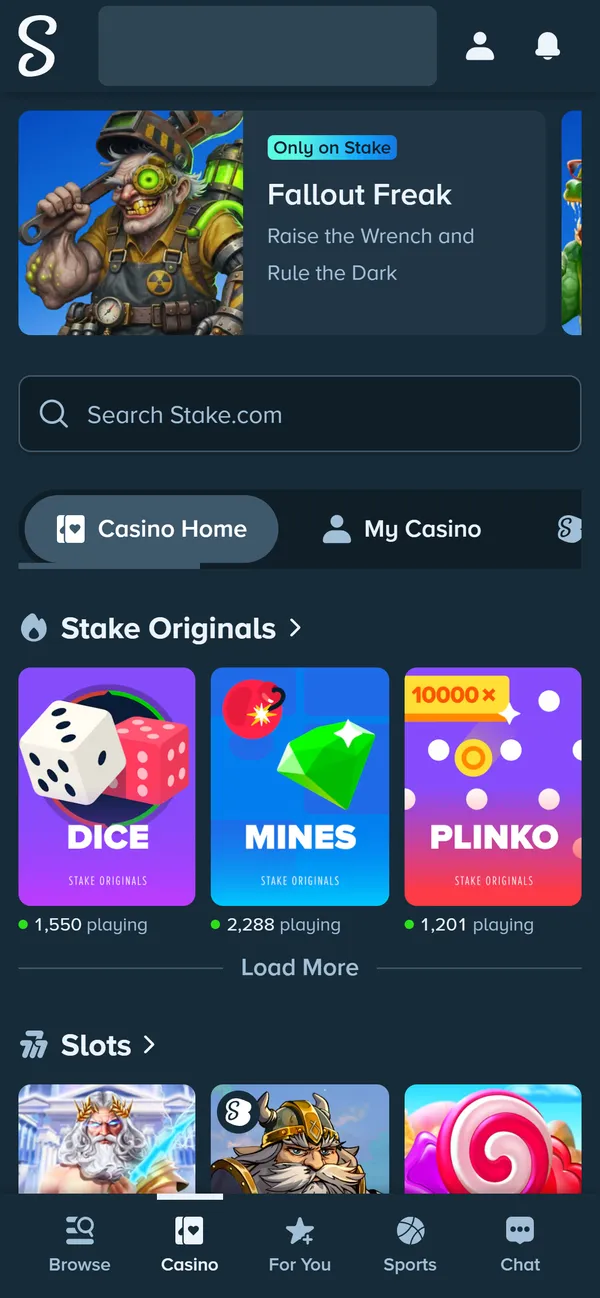
The site opens in its own window without the browser's address bar – just like a full-fledged app.Show screenshotHide screenshot
Stake on a 390px phone screen – the full site with bottom navigation. Balance hidden. Screenshot taken November 2026.
iOS (iPhone / iPad)
- 1
Search the App Store
Look for "Stake - Real Money Casino" or the Stake sportsbook app and check that the developer is Stake.com. The apps are only listed in countries where Stake can offer them. - 2
No app in your country? Open stake.com in Safari
Since iOS 16.4, Chrome and Edge can also add sites to the Home Screen, but Safari is the most reliable option. - 3
Tap Share → "Add to Home Screen"
The Share icon is a square with an upward arrow. In the default Compact layout of iOS 26, tap "•••" first, then Share – and keep "Open as Web App" switched on. - 4
Done – the icon is on your Home Screen
The web app opens full screen and keeps you signed in between launches.Show screenshotHide screenshot
Stake on a 390px phone screen – the full site with bottom navigation. Balance hidden. Screenshot taken November 2026.
Requirements & compatibility
| Parameter | Requirement | Note |
|---|---|---|
| Android | A current version of Chrome or another Chromium-based browser | Installed from the browser menu |
| iOS – App Store app | A recent iOS version (the sportsbook app needs iOS 16 or later) | Listed only in selected countries |
| iOS – web app | Safari, or Chrome/Edge on iOS 16.4 and later | Installed via Share → "Add to Home Screen" |
| Internet connection | A stable connection for live games and bets | Wi-Fi or mobile data |
Pros and cons
✓ Pros
- ✓Official iOS apps where the App Store allows them
- ✓The web app installs in a few taps on any phone, no app store needed
- ✓Same account, balance and features as the desktop site
- ✓The web app updates itself – no new versions to download
✕ Cons
- ✕No Google Play app in most countries – Android users install from the browser
- ✕The iOS apps aren't listed in every country's App Store
- ✕No offline mode – an internet connection is always required
- ✕Fake APKs and look-alike apps exist – always check that the developer is Stake.com
Security
The web app is the same stake.com domain opened in its own window: login, balance and data are handled exactly as on the site. Only install it from stake.com or an official mirror listed in Stake's Help Center, and in the App Store check that the developer is Stake.com – third-party APK files and look-alike apps aren't affiliated with Stake and put your account and device at risk – how to spot fake sites and apps. Also turn on 2FA.
Installation & login
There's no "Install app" option in the browser menu
I can't find the Stake app in the App Store
The icon installed, but the app opens a blank page
The app asks me to log in again after installing
The app runs slower than the site
General questions
Do I need to download an APK file from another site?
Is the app paid?
Does Stake.US work in the same app?
Does the app's functionality differ from the desktop site?
Related guides
Registration
Create a Stake account in a couple of minutes and add a referral code.
Welcome offer
How referral codes work and why you have 24 hours to enter one.
Troubleshooting hub
Answers on verification, withdrawals, technical issues and bonuses.
Stake.US for US players
The sweepstakes casino: Gold Coins, Stake Cash and state availability.
Ready to get started?
After installing the app, register an account and complete verification – or resolve an issue through the troubleshooting hub if something went wrong.