
How to Deposit on Stake
Stake is built around crypto deposits: you send coins to an address from your Wallet, and the balance is credited once the network confirms the transfer. Picking the right network is the one step you can't get wrong.
How to deposit crypto
- 1
Open Wallet → Deposit
The Wallet button is at the top of every page on stake.com.Show screenshotHide screenshot
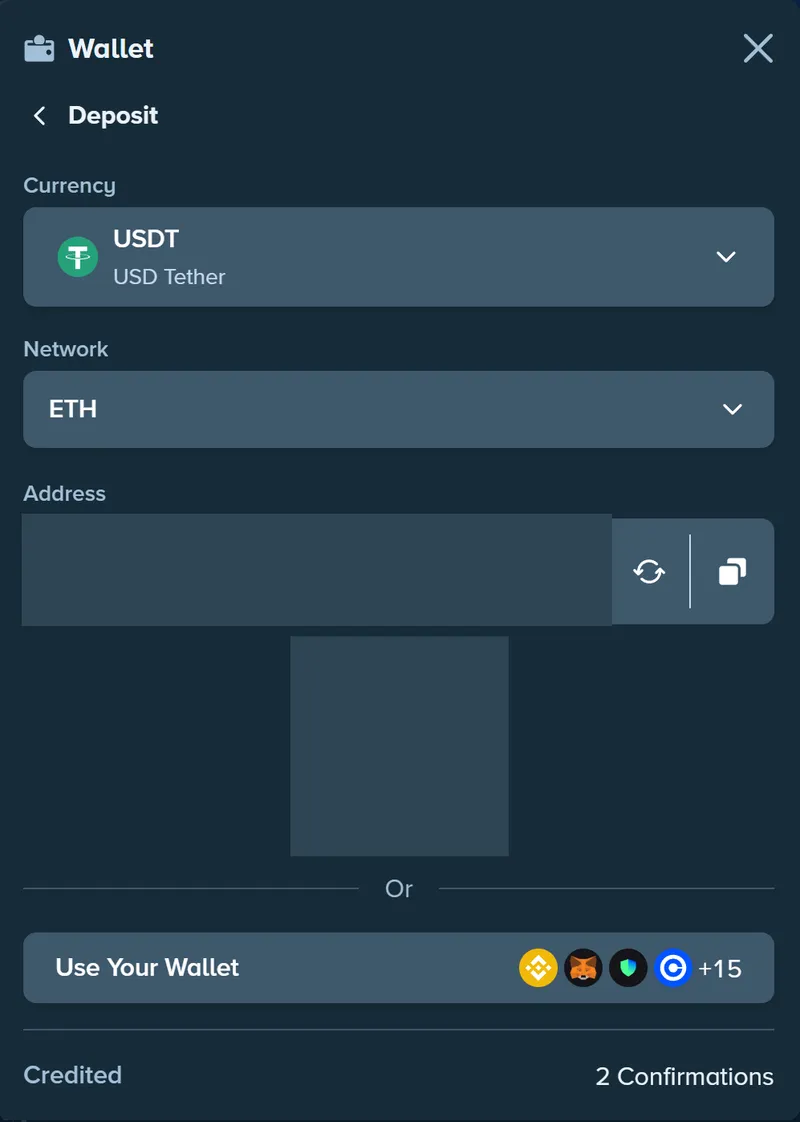
Wallet → Deposit: choose the currency and network first – USDT on Ethereum is credited after 2 confirmations. Address and QR code hidden. Screenshot taken November 2026. - 2
Choose the currency
Pick the coin you're going to send – for example BTC, ETH, LTC or USDT. - 3
Choose the network
Many coins exist on several blockchains – USDT, for instance. The network you select must be the one you send from; a mismatch is the most expensive mistake you can make. - 4
Copy the address (and memo, if shown)
Copy the address or scan the QR code. Some coins, such as XRP, also need a memo or destination tag – if Stake shows one, include it. - 5
Send from your wallet or exchange
Paste the address, check the first and last characters, and send. Your wallet or exchange charges its own network fee. - 6
Wait for the confirmations
The Deposit window shows how many network confirmations a currency needs – USDT on Ethereum, for example, is credited after 2. The balance updates after the last one.
Supported cryptocurrencies
A selection of the coins Stake accepts – the Deposit window always shows the current list.
Popular coins (14)
- Bitcoin (BTC)
- Ethereum (ETH)
- Litecoin (LTC)
- Dogecoin (DOGE)
- Tether (USDT)
- USD Coin (USDC)
- Bitcoin Cash (BCH)
- XRP
- Tron (TRX)
- BNB
- Solana (SOL)
- Polygon (POL)
- Chainlink (LINK)
- Dai (DAI)
Stake supports more than 20 cryptocurrencies in total. In some countries it also offers local-currency payment methods.
What happens if something goes wrong
| Situation | What happens | What to do |
|---|---|---|
| Right network, still not credited | The deposit is waiting for confirmations | Check the transaction hash in the network's block explorer and wait for the required confirmations |
| Wrong network | The funds generally can't be recovered – blockchain transfers are irreversible | Contact live chat with the transaction hash straight away; recovery isn't guaranteed |
| Memo or tag missing | The deposit reaches Stake but can't be matched to your account automatically | Contact live chat with the transaction hash, amount and time |
| A coin or token Stake doesn't support | It won't be credited | Only send currencies listed in your Deposit window |
No crypto yet?
In many countries the Stake Wallet has a buy-crypto option run by third-party payment providers. They charge their own fees and may ask for their own verification, so compare the total cost before you buy.
The alternative is to buy coins on a crypto exchange and send them to your Stake deposit address – the same steps as above. Exchanges often label networks by token standard: ERC-20 means Ethereum, TRC-20 means Tron and BEP-20 means BNB Smart Chain.
Where Stake offers local-currency payment methods, they appear in the Wallet alongside crypto. Processing times and limits depend on the method.
Checklist before you send
- ✓The currency and the network in Stake's Deposit window match what you're sending.
- ✓The address is pasted, not typed – and the first and last characters match.
- ✓The memo or destination tag is included if Stake shows one.
- ✓You're on the real stake.com or an official mirror – how to check.
- ✓You've set a deposit limit if you want one – responsible gambling tools.
Frequently asked questions
How long does a Stake deposit take?
Does Stake charge a deposit fee?
I sent a deposit but my balance wasn't credited – why?
Can I deposit straight from an exchange?
Related guides
Withdrawals
How to withdraw, how long it takes, fees and what can hold a payout.
Crypto payments on Stake
Why deposits are fast and what can slow a withdrawal down.
Welcome offer
How referral codes work and why you have 24 hours to enter one.
Responsible gambling
Limits, Break in Play, self-exclusion and free support.