
Stake Verification (KYC): What to Prepare and How to Pass
Stake splits identity checks into two tabs in Settings. Finish the first one before your first withdrawal and prepare for the second if you play larger volumes – it saves days of waiting later.
When Stake asks you to verify
Stake usually asks for identity verification before your first withdrawal – in some countries earlier. The compliance team can also request documents at any time, for example after a large deposit or a run of big wins.
Verification happens in two tabs in your account settings. The Verification tab covers your residence and personal details plus an ID document; the Enhanced Verification tab adds proof of address and, if requested, proof of the source of your funds.
Doing it right after registration is the simplest way to avoid a withdrawal that sits on hold – incomplete verification is the most common reason for one.
The four parts of verification
What each part asks for and how long it usually takes.
Residence & personal details
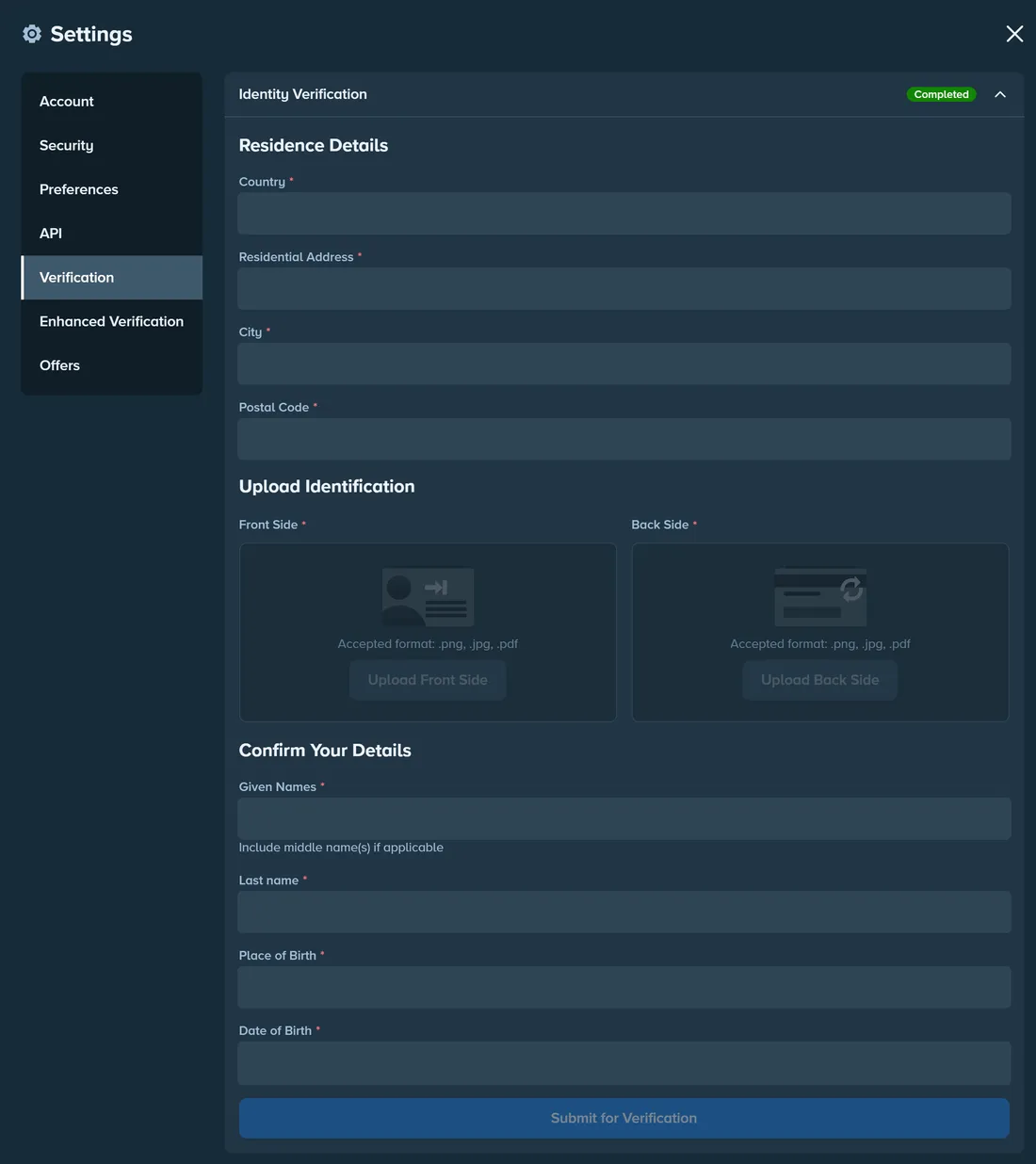
Country, residential address, city and postal code; given names, last name, place and date of birth. Takes a few minutes. Everything must match your ID exactly, including middle names.
Identity document
Passport, national ID card or driving licence – front and back, as .png, .jpg or .pdf. A colour, high-resolution photo of the original, valid for at least 3 more months. Usually checked within minutes to hours; Stake may also ask for a selfie with the document.
Proof of address
Utility bill, bank or card statement, council or tax letter, tenancy agreement, or an official employer or school letter – issued within the last six months and photographed flat with all four corners in the frame.
Source of funds
Occupation details plus a document such as bank statements, payslips, tax returns or inheritance papers. Unlocks only after proof of address and usually takes the longest. Requested for larger transaction volumes or at the compliance team's discretion.
How to complete Verification
The first tab – enough for most players.
- 1
Open Settings → Verification
Click your profile, open Settings and pick the Verification tab.Show screenshotHide screenshot
Settings → Verification: residence details, both sides of your ID and personal details. Personal data hidden. Screenshot taken November 2026. - 2
Enter your residence details
Country, residential address, city and postal code – the address you can later prove with a document. - 3
Upload both sides of your ID
A passport, national ID card or driving licence. Photograph the physical document in colour – screenshots and scans of copies are rejected. - 4
Fill in your personal details
Given names (including middle names), last name, place and date of birth – exactly as printed in the document. - 5
Submit and wait for the check
Document checks usually take from a few minutes to a few hours. If Stake asks for a selfie with the document, you'll see the request in the same tab.
How to complete Enhanced Verification
Only needed when Stake asks for it or before larger withdrawals.
- 1
Open Settings → Enhanced Verification
Proof of address comes first; the source-of-funds section stays locked until it's approved.Show screenshotHide screenshot
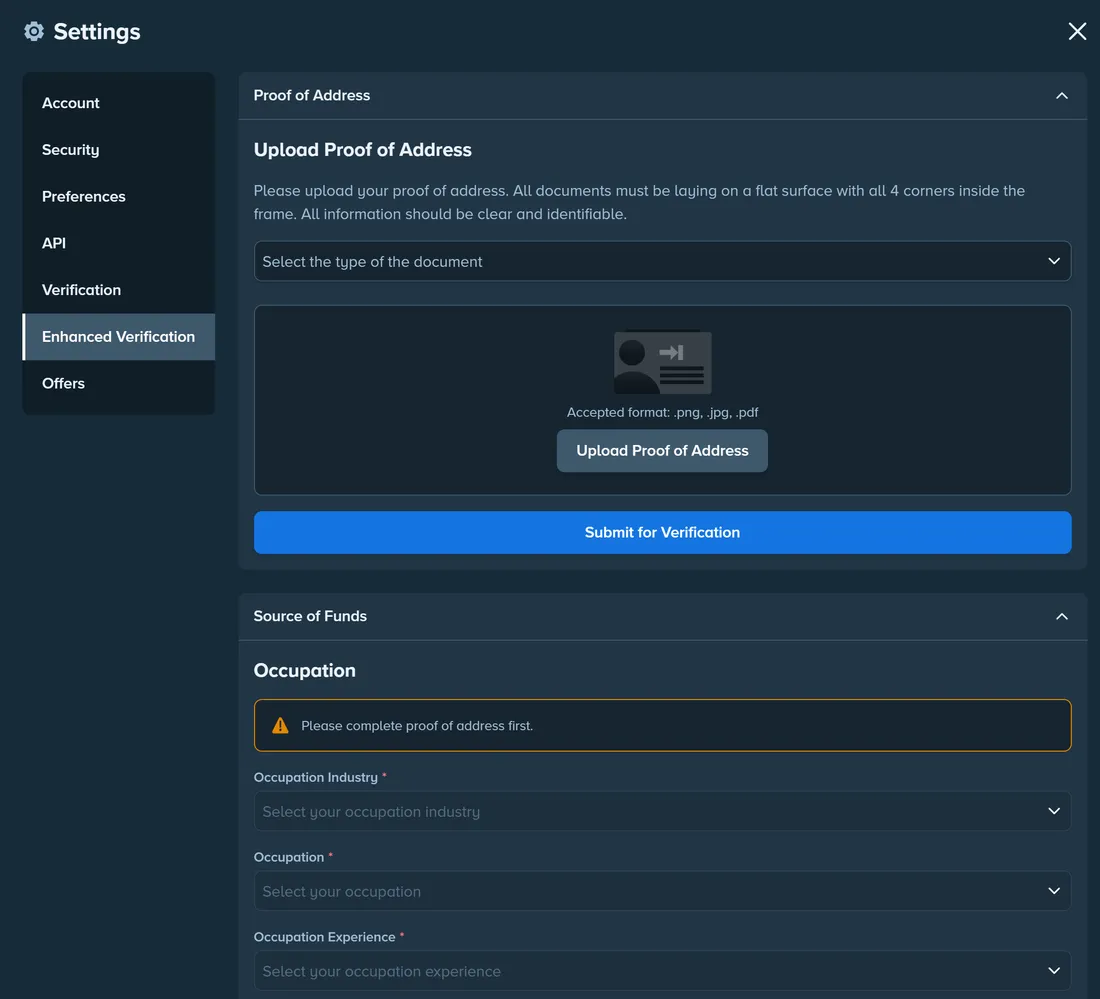
Settings → Enhanced Verification: proof of address comes first, source of funds unlocks after it. Screenshot taken November 2026. - 2
Upload a proof of address
Issued within the last six months, in your name and showing the address you entered. Mobile phone bills, purchase receipts and medical bills aren't accepted. - 3
Provide your source of funds
Describe your occupation and upload a supporting document – bank statements, payslips, tax returns or inheritance papers. This review takes the longest.
How to pass verification on the first try
Photograph the original document
Stake accepts only colour, high-resolution photos of the physical document – screenshots and digital copies are rejected.
Keep all four corners in the frame
Lay the document flat and avoid glare and blur – cropped edges are one of the most common reasons for rejection.
Your details must match your document
The names, place and date of birth you enter must exactly match the ID you upload.
Check the expiry date
The ID has to be valid for at least 3 more months – a document about to expire will be rejected.
Proof of address: issued within six months
Older bills and statements are rejected, and so are mobile phone bills, purchase receipts and medical bills.
Answer requests in the same account
If compliance asks for more documents, upload them in the tab they point to – sending files by email or chat slows the review down.
Accepted and rejected documents
| Check | Accepted | Rejected |
|---|---|---|
| Identity | Passport, national ID card or driving licence – front and back, colour, high resolution, valid for 3+ months | Screenshots, digital copies, black-and-white images, cropped or blurred photos, documents about to expire |
| Proof of address | Utility bill, bank or card statement, council or tax letter, tenancy agreement, official employer or school letter – issued within 6 months | Mobile phone bills, purchase receipts, medical bills, documents older than 6 months |
| Source of funds | Bank statements, payslips, tax returns, inheritance papers – plus your occupation details | Documents that don't show your name or don't explain the funds you deposited |
Based on the Stake Help Center. The compliance team can ask for other documents in individual cases.
Frequently asked questions
Do I have to verify before I can play?
How long does Stake verification take?
Why was my document rejected?
What is Enhanced Verification for?
Does verification affect bonuses?
Related guides
Withdrawals
How to withdraw, how long it takes, fees and what can hold a payout.
Registration
Create a Stake account in a couple of minutes and add a referral code.
Account security
2FA, passkeys, the Vault, sessions and how to spot fake Stake emails.
Troubleshooting hub
Answers on verification, withdrawals, technical issues and bonuses.